
MySQL
MySQL is an open source relational database management system. With its proven performance, reliability, and ease-of-use, MySQL is the leading database choice for web-based applications. The MySQL connector by IConduct allows business users to export and import organization’s data onto and from MySQL databases.
To configure the MySQL connector, follow the instructions below:
- In the Admin Navigation tree, select Connections and click New.

Connections Section in the Admin Navigation Tree
- On the Connector Selection Page select the MySQL item from the Database Servers section..
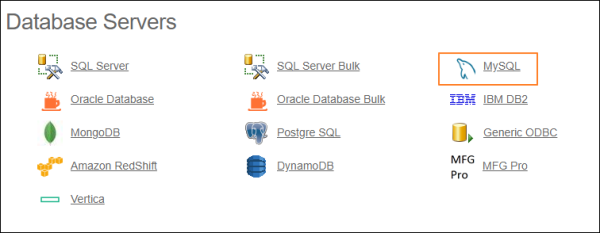
Connector Selection Page
- In the MySQL Connection work area, fill in the following fields and click Save.
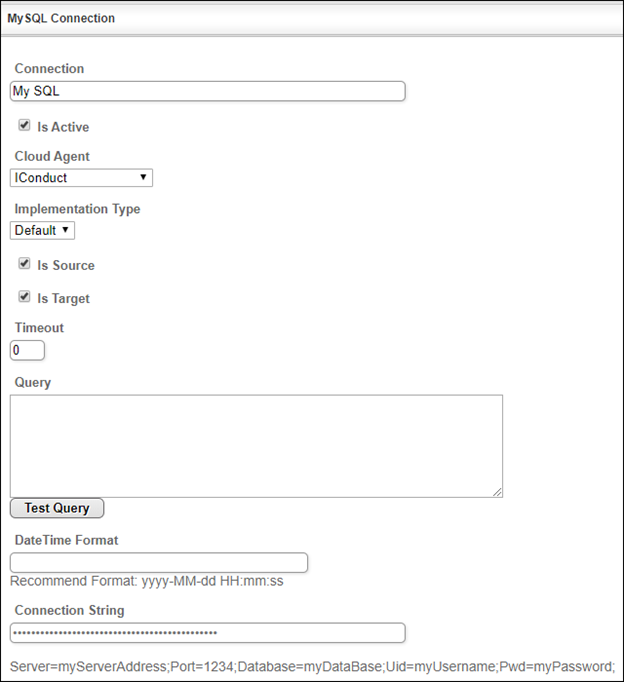
Connection Work Area
| Fields | Description |
|---|---|
|
Connection* |
A new connection name. Enter a connection alias here. |
|
Is Active |
Toggles connector’s activity at interface execution. Enable the checkbox to activate the connection for execution. |
|
Cloud Agent* |
The LAN you are working with. Select "IConduct" for cloud systems and your corporate agent for internal systems. |
|
Implementation Type* |
Defines the implementation type. Select from the drop-down list:
|
|
Is Source |
This connection entity is available as a data source for Import (writing to Schema). Enable the checkbox to ensure data import. |
|
Is Target |
This connection entity is available as a data target that receives data from schema to current data container. Enable the checkbox to ensure data export. |
|
Timeout |
The length of time (in milliseconds) the IConduct platform waits for a response from the connection provider before returning a timeout error. Set the time value to stop the system from connection attempts. |
|
Query |
The box is intended for entering a query. You can test the defined query by clicking Test Query once the connection is saved. It’s recommended to test the query after the connection testing. |
|
DateTime Format |
Allows defining the date and time formats appropriate for the connection. Recommended format: yyyy-MM-dd HH:mm:ss |
|
Connection String*
|
A string that specifies information about a data source and the means of connecting to it. Refer to this page for more information about connection strings. Example: Server=myServerAddress;Port=1234;Database=myDataBase; Uid=myUsername;Pwd=myPassword; |
* - mandatory fields
Once the connection is saved, you can test if it is successful. Click Test Connection in the toolbar. If the created connection works, you will receive a success message.

Testing the Connection